 |
| Image by Pexels from Pixabay |
With summer approaching, it’s the perfect time to capture some great library photos!
Original, high-quality photography is recommended over stock photos, and has a significant role in a library’s marketing efforts. Summer programs, especially those with performers, are ideal for taking original photos.
Smart phones, tablets, or digital cameras can be used to take photos. While expensive equipment is not necessary, understanding and practicing some tips will help even the most inexperienced photographer take the best photos possible.
Before Taking Photos
Here are some tips before you begin taking photos at library events.
- Photography Policies in the Library: Consult with your municipality on existing policies on photography and public spaces. While a public sign noting the library will be taking photographs during programs that draw large crowds of participants is a positive, transparent gesture, having photo release photo forms kept on file is a better option. Additionally, unless it’s a contest or event that involves food, it’s not best practice to take photos of people eating or drinking. See the following resources on photography policies:
- Ask for Assistance: Events at the library can be chaotic and crazy. Whether it’s a presenter who is running late or more people show up than you thought, having someone designated on staff to focus solely on taking photos ensures that it happens. If you are the person coordinating a busy event, remembering to take pictures might not happen. If you want to be the main person taking photos, ask for help from other staff during the event.
- Capabilities: Are you aware of the features of the tool you are using to take photos? If you are using a smartphone, how many cameras does your phone have and what do they do? What are your camera’s zoom capabilities, optical or digital? For example, smartphones that have a telephoto lens provide optical zoom, allowing someone to get closer to the subject without sacrificing image quality. A Google or YouTube video search on your camera or smartphone make and model can provide this information.
- Phone Icon: Do you know how to access your camera on your smartphone? Can you access it quickly? While this might seem like too basic of a tip, knowing how to access your camera can mean the difference between getting a great photo or missing one.
- Lens: Make sure you periodically clean your camera lens with a cloth or paper towel.
- Set Up: The photos you take in a meeting room for story time in the morning could look different than the photos for an evening program. Before your library event, take a few “practice shots” to get a sense of how your photos might look.
- Location: Where should the photographer be when the library event is happening? Do they have a clear path or view to get photos? Reserving a seat or place for them during an event ensures that heads or hands won’t be in the way of a great picture.
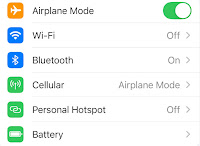
Turn on Airplane Mode: If it’s possible, set your phone to Airplane Mode to avoid calls, texts, and messages popping up while trying to take photos.

Here are some tips to ensure the most dynamic photos.
- Be Steady: Photo quality is diminished or photos can be blurry if a camera is not steady. Investing in a tripod, for as little as $20, can make a big difference. If a tripod is not available, holding a phone or camera with both hands and leaning against a wall or something steady for support will help.
- Lighting: Natural lighting for a photo is always preferred to artificial lighting. If the room is on the dark side, use the flash on the camera. Photos could also be taken in “Night Mode.” If outdoors, photos should be taken with the sun behind the camera
- Incorporate the Rule of Thirds: While this guideline does not have to be used for every photo, incorporating the Rule of Thirds can be used to create stronger images. Dividing an image into thirds (using two gridlines), place the subject of a photo on one of the sides instead of in the center of the photo. Turning on the phone’s “gridline” setting can help guide this rule.
- Vary the Orientation: It could feel natural to want to take most photos in portrait or vertical mode. Vary photos by using landscape/horizontal mode or using the square (4:3) mode.
- Action: Action shots are more interesting than shots that are posed. If a camera has a setting to increase its shutter speed, use it. Most camera phones have a burst mode or a way to take continuous shots. This is ideal for taking photos of action or fast-moving subjects.
- Faces and Subjects: Along with action shots, photos of faces are more likely to receive engagement on social media pages. Group photos are great at capturing the overall feel of a library event. Shots of close-ups of one or two people can also capture these moments.
- Get Down: While using digital or optical zoom features on cameras is ideal, there might be times when it is more practical to move closer to the subject or get lower to the ground. Keep this in mind when trying to get photos of kids or low-level subjects.
- Get Up: While many cameras, including smartphones, have either a wide or ultra wide lens, it could be necessary to be higher than subjects to capture group photos. Using a stepstool is a safe and quick way to capture a unique, elevated point of view.
- Turn Around: Sometimes the best photos capture audience reactions rather than the main action. If a performer is eliciting laughter or enthusiasm, turn around to capture those lively expressions.
After Taking Photos

Crop: Removing chairs, hands, arms, or objects that are in the way of the subject will give photos a stronger presence.
Edit: In some cases, editing a photo using a filter on the camera or smartphone could be necessary. Editing apps such as Canva, SnapSeed and befunky all have free versions that can be used to enhance photos. Remember that when it comes to editing, less is more.
Organize or Store: Once photos are posted or ready to be shared, they can be organized in files on a computer. Using a storage app such as Google Photos, Dropbox or Snapfish ensures photos won’t be accidentally deleted from a phone. Archived photos should be clearly labelled with the event’s title and date.


